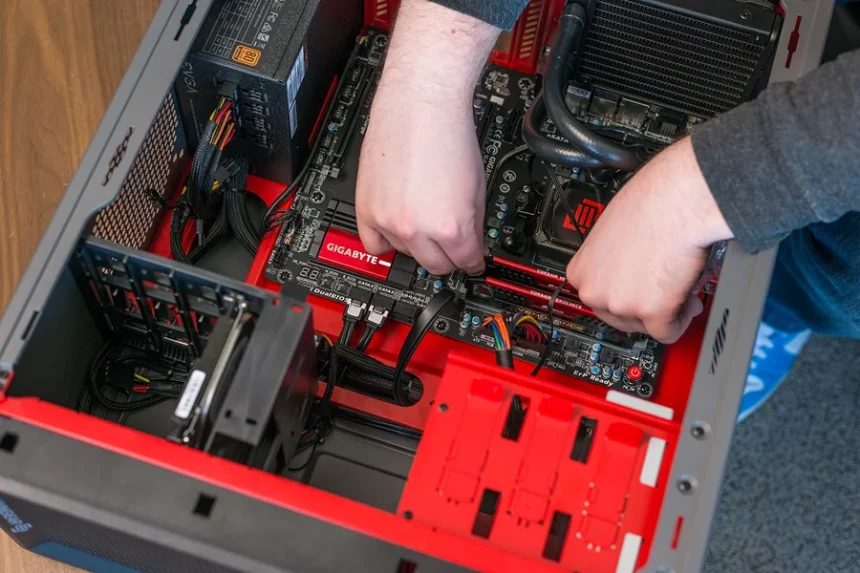
Building your own PC can be a rewarding and cost-effective way to get exactly the performance you want whether you’re gaming, working, or creating. However, choosing the right PC components can sometimes feel overwhelming with so many options available. This guide aims to break down the essentials, helping you select the perfect parts for your custom build, including considerations for demanding titles.
Why Choosing the Right PC Components Matters
Every part of your PC plays a critical role in how well your system performs. The processor handles calculations, the graphics card renders images, and storage affects loading times. Neglecting any of these can result in bottlenecks, meaning one part slows down the entire system. For instance, if you want a smooth experience playing Project Cars 2 a racing simulator known for its detailed graphics and realistic physics you’ll need a system that balances power and speed.
Understanding the Core PC Components
1. CPU
The CPU is often called the brain of the PC. It processes all instructions, runs programs, and handles physics calculations in games like Project Cars 2.
- What to look for:
For gaming, aim for a quad-core processor at minimum, with a focus on high clock speeds. Popular options include Intel’s Core i5 or AMD Ryzen 5 series. For heavy multitasking or streaming, consider Intel Core i7 or Ryzen 7.
- Why it matters:
A powerful CPU ensures smooth gameplay and faster load times, especially in CPU-intensive games or simulations with complex calculations.
2. GPU
The GPU is critical for rendering visuals. In a racing game like Project Cars 2, where real-time reflections, lighting effects, and detailed environments are common, the graphics card’s power is paramount.
- What to look for:
NVIDIA’s GeForce RTX series or AMD’s Radeon RX series are excellent choices. For smooth 1080p gaming, a mid-range card like the RTX 3060 or RX 6600 XT works well. For higher resolutions or ultra settings, consider RTX 3070 or above.
- Why it matters:
A strong GPU provides better frame rates and visual quality, giving you an immersive gaming experience.
3. RAM
RAM stores data your PC needs quick access to. Games, especially simulation titles like Project Cars 2, benefit from ample memory to avoid stuttering or slowdowns.
- What to look for:
8GB is the bare minimum, but 16GB of DDR4 RAM at speeds of 3000MHz or higher is ideal for gaming and multitasking.
- Why it matters:
Insufficient RAM can cause bottlenecks, leading to frame drops and longer load times.
4. Storage
Storage affects not only how much you can install but also how quickly your system boots and games load.
- What to look for:
An SSD (Solid State Drive) is highly recommended for faster load times. NVMe SSDs offer even quicker data access than standard SATA SSDs. Pairing an SSD with a larger HDD for bulk storage is common.
- Why it matters:
Faster storage means quicker game loading and smoother overall performance.
5. Motherboard
The motherboard connects all your components and allows communication between them.
- What to look for:
Choose a motherboard compatible with your CPU’s socket type and features you need, such as USB ports, RAM capacity, and expansion slots.
- Why it matters:
A reliable motherboard ensures stability and future upgradeability.
6. Power Supply Unit
The PSU powers your PC components. Choosing a quality PSU with enough wattage is crucial.
- What to look for:
Calculate your system’s power needs and add a 20-30% buffer. Look for units with 80 Plus certification for efficiency.
- Why it matters:
A poor PSU can cause system instability or damage components.
7. Cooling Solutions
Cooling keeps your PC running efficiently and prevents overheating.
- What to look for:
Stock coolers may suffice for budget builds, but aftermarket air or liquid coolers improve temperature control, especially for overclocked CPUs or powerful GPUs.
- Why it matters:
Good cooling prolongs hardware life and maintains performance under load.
Building a PC for Project Cars 2
Project Cars 2 is a great example of a demanding racing simulation that benefits from a balanced build. Realistic physics, dynamic weather, and high-quality textures require both a strong CPU and GPU.
Minimum Specs for a Smooth Experience
- CPU: Quad-core processor, Intel Core i5 or Ryzen 5
- GPU: NVIDIA GTX 1660 or AMD RX 580
- RAM: 8GB DDR4
- Storage: 256GB SSD for OS and game files
Recommended Specs for High Settings
- CPU: Intel Core i7 or Ryzen 7
- GPU: NVIDIA RTX 3060 or AMD RX 6600 XT
- RAM: 16GB DDR4
- Storage: 500GB NVMe SSD
With these specs, your PC will deliver smooth frame rates, crisp visuals, and minimal loading delays, making every race a thrill.
Tips for Selecting Compatible Components
- Check compatibility: Use tools like PCPartPicker to ensure all your components work together.
- Consider future upgrades: Invest in a motherboard and PSU that allow you to upgrade RAM or GPU later.
- Don’t skimp on quality: Especially with PSUs and motherboards, low-quality parts can cause failures.
Why Buying Prebuilt PCs Can Be a Smart Choice
If building from scratch feels daunting, prebuilt systems from a trusted retailer can save time and hassle. Many prebuilt gaming PC store now offer custom options with components tailored to games like Project Cars 2.
Benefits include:
- Tested and ready-to-use systems
- Warranty and support included
- Often competitively priced thanks to bulk purchasing
- Fast shipping and no assembly required
Stores specializing in gaming rigs ensure you get the right balance of components to deliver an optimal experience.
Final Thoughts
Choosing the right PC components for your build boils down to balance and purpose. For gaming titles like Project Cars 2, where visuals and simulation detail are key, investing in a capable CPU, a strong GPU, and sufficient RAM is essential. Fast storage and quality cooling complete the picture for a smooth, immersive experience.
Whether you build your PC yourself or choose a trusted prebuilt option, focusing on the right components ensures you get the most out of your investment. Take your time, research, and build a setup that will deliver thrilling races for years to come.